Stable
1.9.9774
Daily-driver build with the safest release cadence.
- Updated
- 14 weeks ago
- File Size
- 515.39 MB
- Release Notes
- Open notes
Stable is the recommended track for most users. Alpha gets you the newest capabilities first.
Daily-driver build with the safest release cadence.
Fastest release track with the newest features and experiments.
Every release stays linked here so you can inspect what changed before you switch versions.
The TextSearch trigger now includes new options in the "Symbols" dropdown. These let you use Windows-based optical character recognition (OCR) to convert images into text. In testing, this approach proved to be more reliable and performant than the previous Tesseract-based OCR used in EyeAuras.
Please note: to use Windows OCR, you must install the required language pack in Windows. For example, if you want to recognize Spanish characters, the Spanish language pack must be installed on your system.
There is also one limitation that still needs to be addressed: Windows OCR does not support multilingual OCR. In practice, this means it cannot recognize Russian and English characters in the same sentence, for example. There are some well-known workarounds for this, but this method should first be tested as-is, without additional logic layered on top.
A few tips:
Чтобы учесть юридические аспекты, я включил обязательное лицензионное соглашение. В этом соглашении указано, что пользователь несет единоличную ответственность за соблюдение лицензионных соглашений любых приложений, которые они автоматизируют.
Как многие из вас знают, игры часто явно указывают, что автоматизация действий любым способом запрещена и может привести к бану. Пожалуйста, имейте это в виду.
Для эффективной работы EyeAuras окно, получающее ввод, обычно должно быть активным. Если это не так, у EyeAuras есть некоторые методы, чтобы автоматически вывести его на передний план.
На первый взгляд, это кажется простым вызовом API в одну строку. Однако из-за различных особенностей Windows это не так просто. В результате я реализовал несколько механизмов для увеличения вероятности успеха.
В этом релизе я ввел дополнительный код для улучшения производительности, особенно в крайних случаях и для приложений, устойчивых к автоматической активации.
Вкратце, если у вас возникают проблемы с активацией окна (например, окно не активируется, когда вы отправляете ввод), пожалуйста, свяжитесь со мной, так как в этой версии были сделаны корректировки.
Это может быть интересно для пользователей из РУ/СНГ - YooKassa теперь снова доступна и вы снова можете оплачивать картами.
Теперь любое действие в Auras можно временно отключить, нажав на флажок рядом с его названием. Это может быть полезно для отладки и также доступно для доступа через систему скриптов, так что вы можете переключать, какие действия будут выполняться, если пользователь выбрал некоторый набор опций в вашем Пользовательском интерфейсе / файле конфигурации / и т.д.

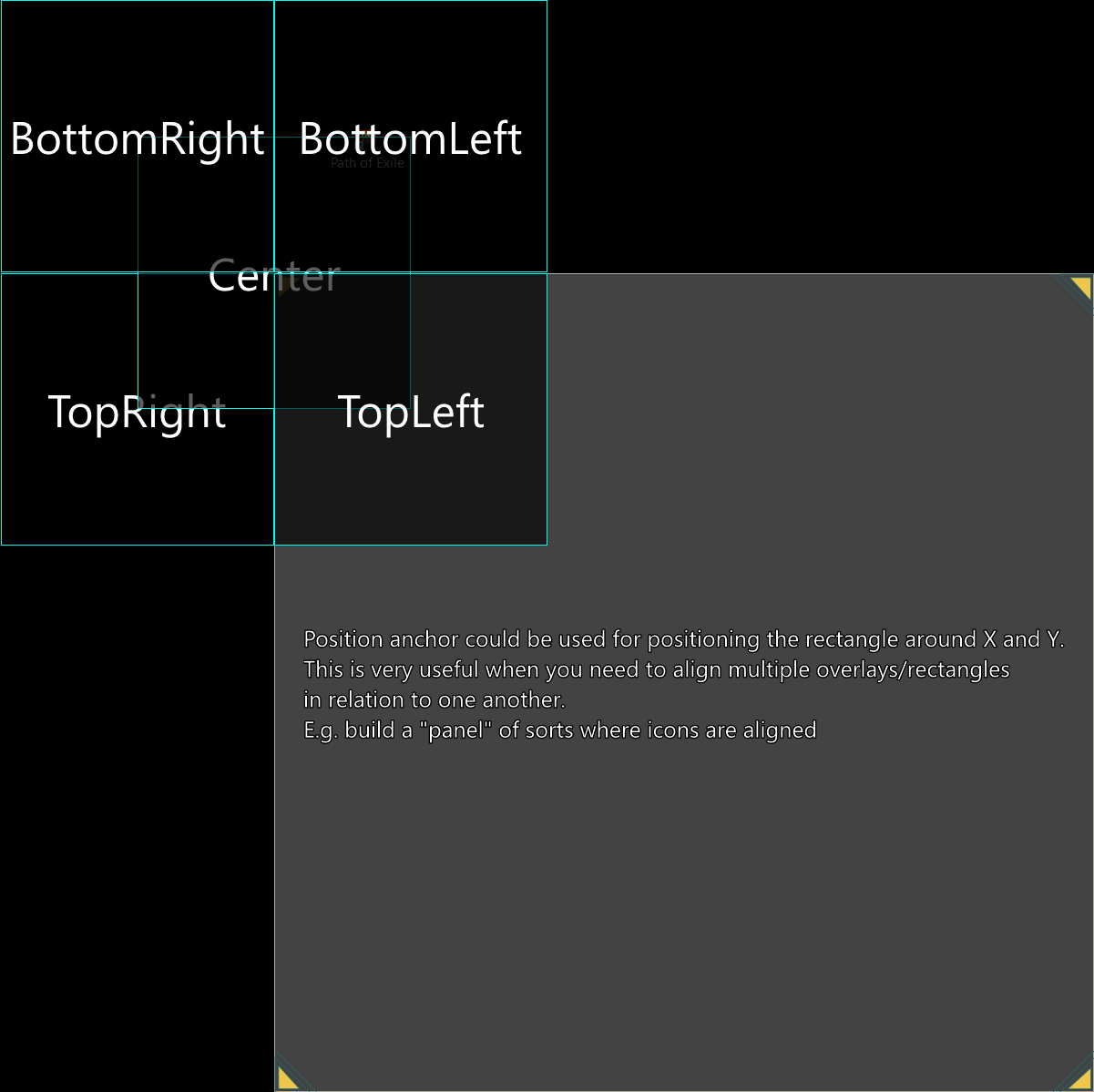
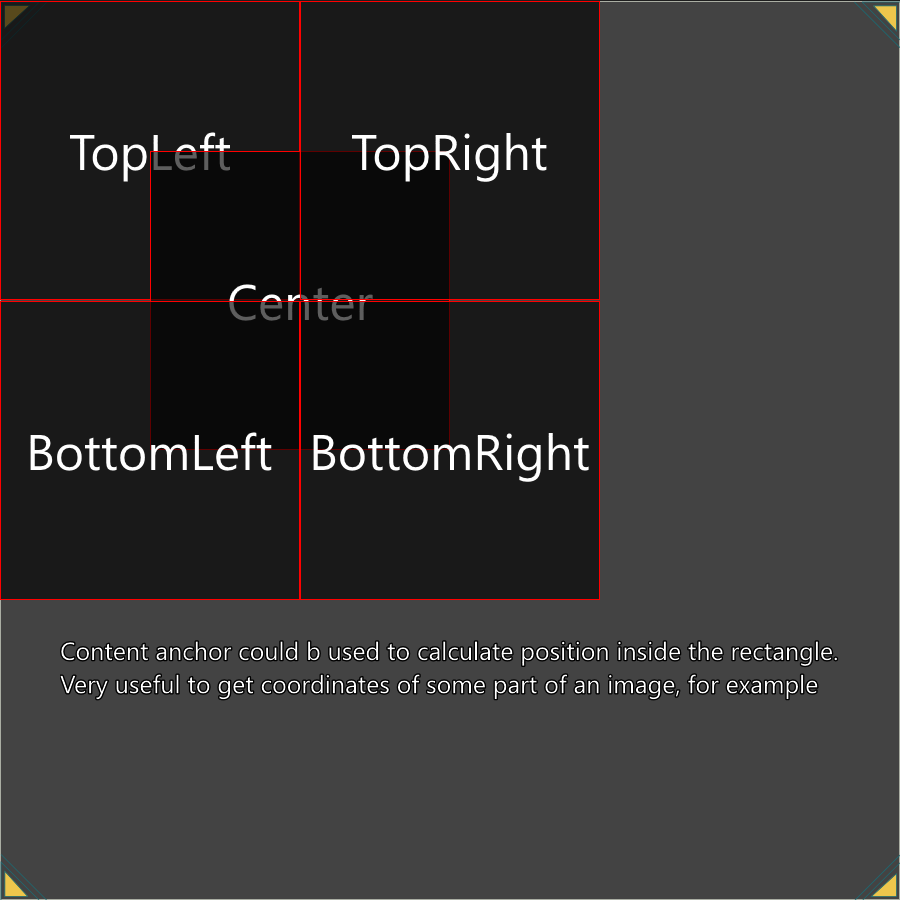
В 5397 я уже внес некоторые изменения в работу якорей на разных экранах EyeAuras, но этого было недостаточно, чтобы охватить некоторые случаи, например, клик по центру изображения, найденного с помощью Поиска изображений
Так что теперь у нас есть два разных типа якорей - Позиция и Содержимое. Это должно обеспечить дополнительную гибкость системе, но также может добавить некоторую путаницу.
Вот основное правило:
Более подробная информация и примеры можно найти на https://wiki.eyeauras.net/en/coordinate-system
В июне основное внимание было уделено улучшению скриптов. Большинство результатов этой работы будут доступны в августе - деревья поведения, поиск пути, визуализация. Я активно работаю над проектом, связанным с Diablo 4, который объединит большинство функций EyeAuras, чтобы доказать, насколько он способен в своем текущем состоянии, поэтому большинство систем, которые я реализую для бота, будут доступны всем пользователям, как только их API стабилизируется. Я напишу подробный пост, как только они будут готовы к публичному использованию. Не стесняйтесь обращаться ко мне напрямую, если вы хотите попробовать некоторые из них раньше других.
Много изменений в Wiki - https://wiki.eyeauras.net/en/home
Якоря - это система координат, которая используется везде, где вам нужно выбрать область чего-то - экрана, изображения и т.д. Идея заключается в том, что, указывая разные точки отсчета, вы можете легко выровнять зоны захвата или вывода относительно друг друга. Более подробная информация и примеры можно найти на https://wiki.eyeauras.net/en/coordinate-system
Довольно узкоспециализированная функция, доступная в настройках, которая позволяет перенаправлять все пользовательские вводы через определенный симулятор.


Two months ago, I introduced a major new feature: the CustomUI overlay. It gave developers the freedom to build custom interfaces using the dynamic duo of C# and Razor, greatly expanding the possibilities for bot/aura customization. It also made navigating the EyeAuras interface more user-friendly.
That said, I realized there was still room for improvement. Developers are used to the power of integrated development environments (IDEs) such as Visual Studio and Rider, but until now those tools could not be fully utilized in the EyeAuras workflow. To change that, I improved the CustomUI overlay so your code can now be exported and saved as a C# project.
The exported project, including EyeAuras.SDK, can be opened in any IDE and gives you access to full autocomplete, unit testing capabilities, and much more. Keep in mind, however, that you still need EyeAuras to actually run the code. I am also working on support for connecting external NuGet packages, which will be the main focus in July.
Another highlight is the new Live Development mode, which lets you push changes into EyeAuras in real time. Whether you are tweaking styles or adding new bot logic, your changes can be reflected within seconds. The potential here is huge, especially with access to triggers, captured images, input simulators, and more.
Please note that actions and triggers currently still run on the old scripting engine, but I am working on migrating them to the new scripting engine while preserving backward compatibility.
In addition to the previous improvements, I added a new similarity calculation method based on Euclidean distance to the color search trigger. You can read more about it on the EyeAuras Wiki.