Stable
1.9.9774
Daily-driver build with the safest release cadence.
- Updated
- 14 weeks ago
- File Size
- 515.39 MB
- Release Notes
- Open notes
Stable is the recommended track for most users. Alpha gets you the newest capabilities first.
Daily-driver build with the safest release cadence.
Fastest release track with the newest features and experiments.
Every release stays linked here so you can inspect what changed before you switch versions.
A small patch focused on improving window responsiveness under load and helping your packs appear in search results faster.
New Memory API documentation for C# scripts has been added. It gradually explains the core memory model in EyeAuras: which backends are available, where to start, how to find a code cave, how to plug in your own IProcess, and how to build custom memory backends.
Useful entry points:
New signed fields were added to UserLicense in the internal licensing APIs, and sublicenses now expose an explicit MaximumSessions.
var license = GetService<ILicenseAccessor>();

Log.Info($"UserId: {license.UserId}");
Log.Info($"Roles: {string.Join(", ", license.Roles)}");
Log.Info($"AppVersion: {license.AppVersion}");

if (license.ShareSublicenses.Length > 0)
{
    Log.Info($"MaximumSessions: {license.ShareSublicenses[0].MaximumSessions}");
}
Read more: Pack sublicenses
IProcessControlApi now includes explicit FreeMemory(...) and ProtectMemory(...) methods. That means an allocated region can now go through the full lifecycle properly: get it through AllocateMemory(...), change protection, perform the required actions, and then release it cleanly.
using System.Diagnostics;
using EyeAuras.Memory;

using var process = LocalProcess.ByProcessId(Process.GetCurrentProcess().Id);
var control = (IProcessControlApi) process;

var region = control.AllocateMemory(
    IntPtr.Zero,
    4096,
    MemoryAllocationType.Commit | MemoryAllocationType.Reserve,
    MemoryProtectionType.ReadWrite);

var oldProtection = control.ProtectMemory(region.Address, region.Size, MemoryProtectionType.ExecuteRead);
control.ProtectMemory(region.Address, region.Size, oldProtection);
control.FreeMemory(region);
Read more: Memory API - Getting started
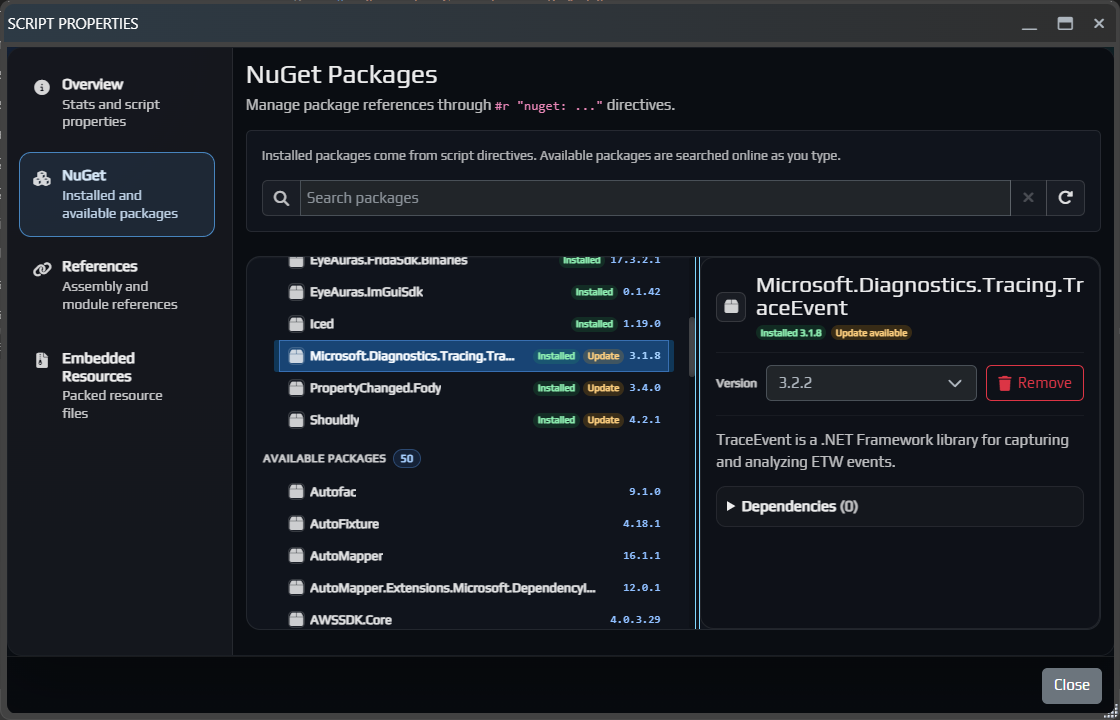
BlazorWindow resizing and dragging were significantly improved, so windows should behave better under loadsublicense limits to the internal licensing APIsScryde detectionC# scripts now have a Properties button that opens a separate script properties window. It brings the main settings and dependencies together in one place: Overview, NuGet package management, References for internal and external assemblies, and Embedded Resources for files that should be distributed together with the script.
Learn more:
Codex now understands EyeAuras-specific details better, so it should be more useful for complex technical tasksExport and Import dialogs to make them more convenient to useBlazor windows, where the window could suddenly jump to the sideICodeHighlightService errorCodex внутри EyeAuras продолжает обрастать более рабочим UX: отдельные threads, более понятный flow работы и в целом более практичный режим для сложных coding-задач.
Если обычный AI Assistant удобнее как быстрый in-app chat и справочник, то Codex уже сейчас лучше воспринимать как отдельный режим для более тяжелых технических задач.
Подробнее про AI Codex Coding Assistant

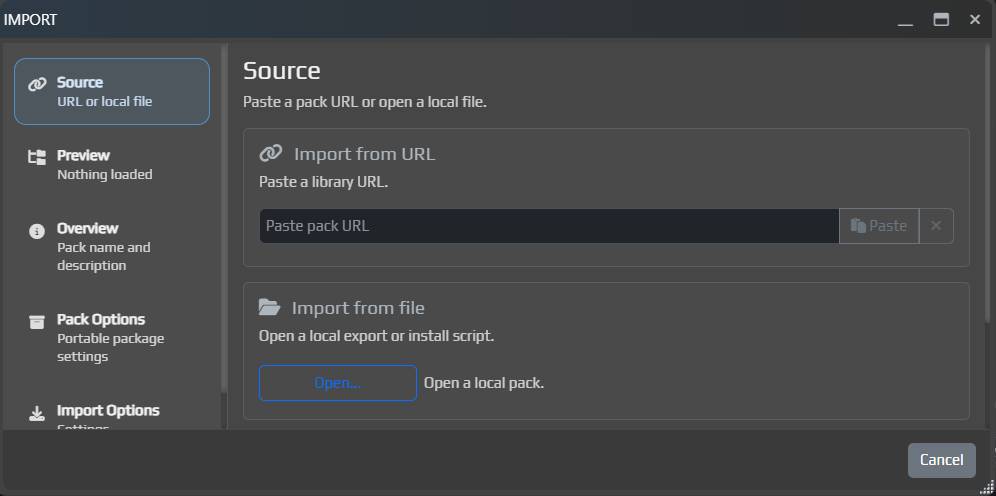
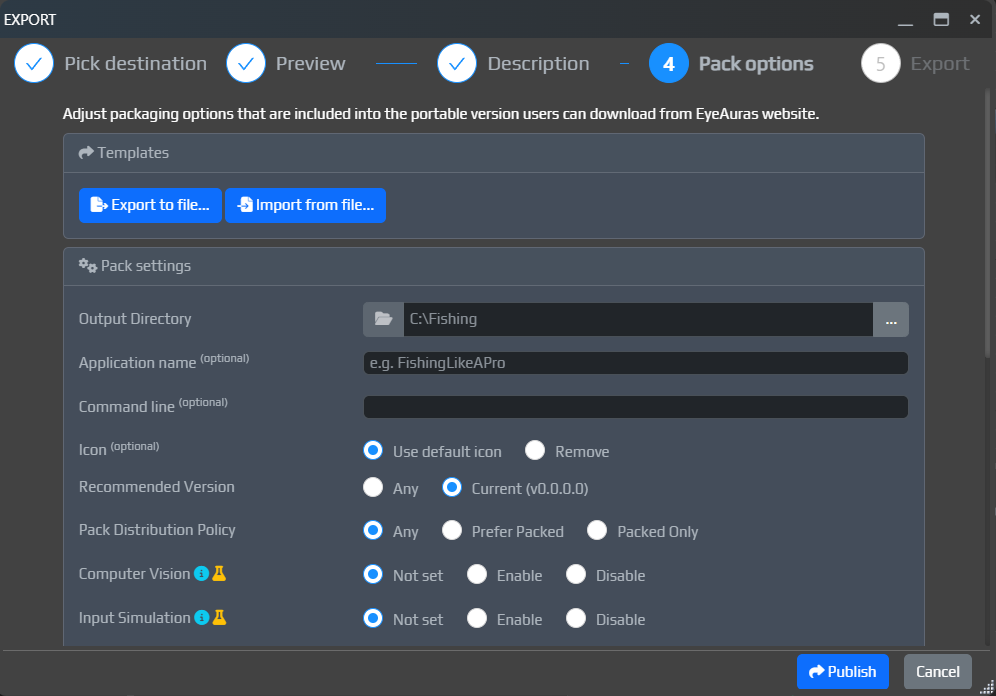
Продолжает развиваться и поток Export / Import: теперь это уже заметно более внятный и удобный способ публиковать pack'и, обновлять их и импортировать обратно с превью и нормальными опциями.
EyeAuras GatewayВ основном добивка багов и полировка нескольких мест в UI
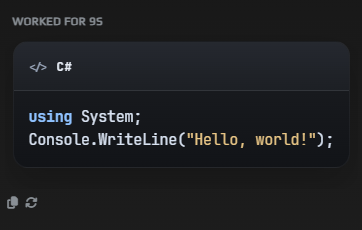
Добавлено отображение кода в блоках
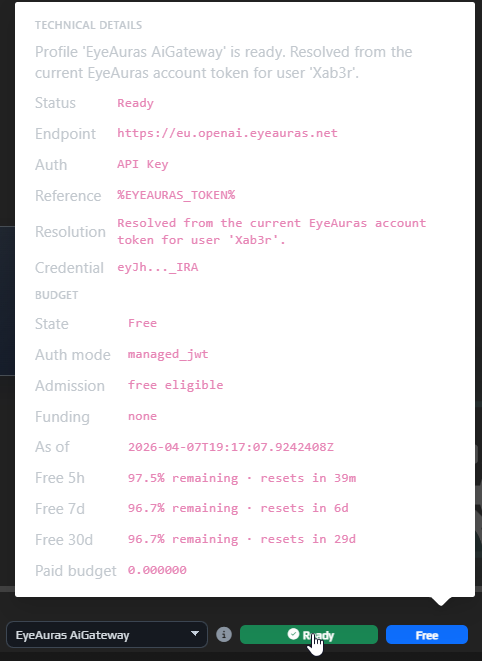
Добавлено отображение бюджета и лимитов (просто наведите мышку на статус рядом с профилем)
Export (когда выставлен режим Binaries Only)Доработано окно Export: прямо там теперь можно задать параметры пакования, а также указать имя и описание pack'а.
Это еще не финальная версия потока. Задача на ближайшие два месяца - довести все до состояния, в котором за 10-15 минут можно будет собрать рабочую mini-app (которую за вас еще и напишет AI), загрузить ее в одно действие и тут же пошарить всем кому это интересно.
Сейчас мы примерно на 70-80% пути к этому (с учетом последних фиксов).
Заодно подтянул и само окно обновления внутри программы.
Теперь в changelog стало удобнее ориентироваться:
RU и EN версиями патчнотов прямо в окне обновления

Добавлены бесплатные лимиты в EyeAuras AI Gateway.
Сделано это для того, чтобы у каждого был AI прямо под рукой, без необходимости регистрировать аккаунт в OpenAI, пополнять там бюджет или оплачивать подписку. Для пользователей из РФ это особенно важно, потому что прямой доступ к OpenAI там до сих пор заблокирован.
Для большинства пользователей AI, скорее всего, будет именно справочником: что-то быстро уточнить, задать разовый вопрос, разобраться в теме и пойти дальше. Я надеюсь, что именно такой формат использования и будет закрываться бесплатными лимитами. Для полноценного кодинга и серьезного скриптинга этого, скорее всего, уже не хватит.
Важно: AI - это дорого. Я оставляю за собой право дальше настраивать объем этих лимитов, их доступность и общие правила использования по мере того, как фича начнет реально нагружаться. Программа бесплатная, при этом хотелось бы чтобы хотя бы какой-то доступ к AI был у абсолютно всех пользователей, так что нужно найти баланс.
Если совсем по-простому, EyeAuras Gateway - это специальный адрес сервера, который можно указать в AI-профиле в поле OpenAI Endpoint, рядом с API Key и остальными настройками.
То есть с точки зрения пользователя это почти тот же OpenAI-профиль, просто вместо стандартного endpoint вы указываете EyeAuras Gateway.
Нужно это в первую очередь тем, кто не хочет заводить свой OpenAI ключ, или живет в РФ. Если у вас уже есть нормальный доступ к OpenAI, то прямой OpenAI обычно все еще проще.
Теперь EyeAuras Gateway умеет работать в двух режимах.
Это основной режим. Вы работаете с AI как пользователь EyeAuras.
В нем вам не нужен свой аккаунт OpenAI. Именно так и работают бесплатные лимиты: расходы на OpenAI идут на стороне EyeAuras, а вы просто пользуетесь AI внутри программы.
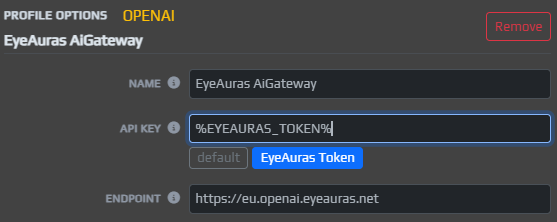
Это запасной режим. В нем Gateway ничего за вас не оплачивает, а просто пробрасывает запросы на серверы OpenAI с вашим собственным ключом.
Нужно это только пользователям из РФ.
Если совсем коротко:
Gateway - хотите пользоваться AI без своего OpenAI аккаунтаProxy - у вас уже есть свой ключ, но нужен удобный путь до OpenAIВажно: в Proxy-режиме ваш персональный ключ OpenAI проходит через сервера EyeAuras. Технически я постарался сделать это максимально безопасно, ничего лишнего не хранить и не логировать, но саму схему работы важно понимать.
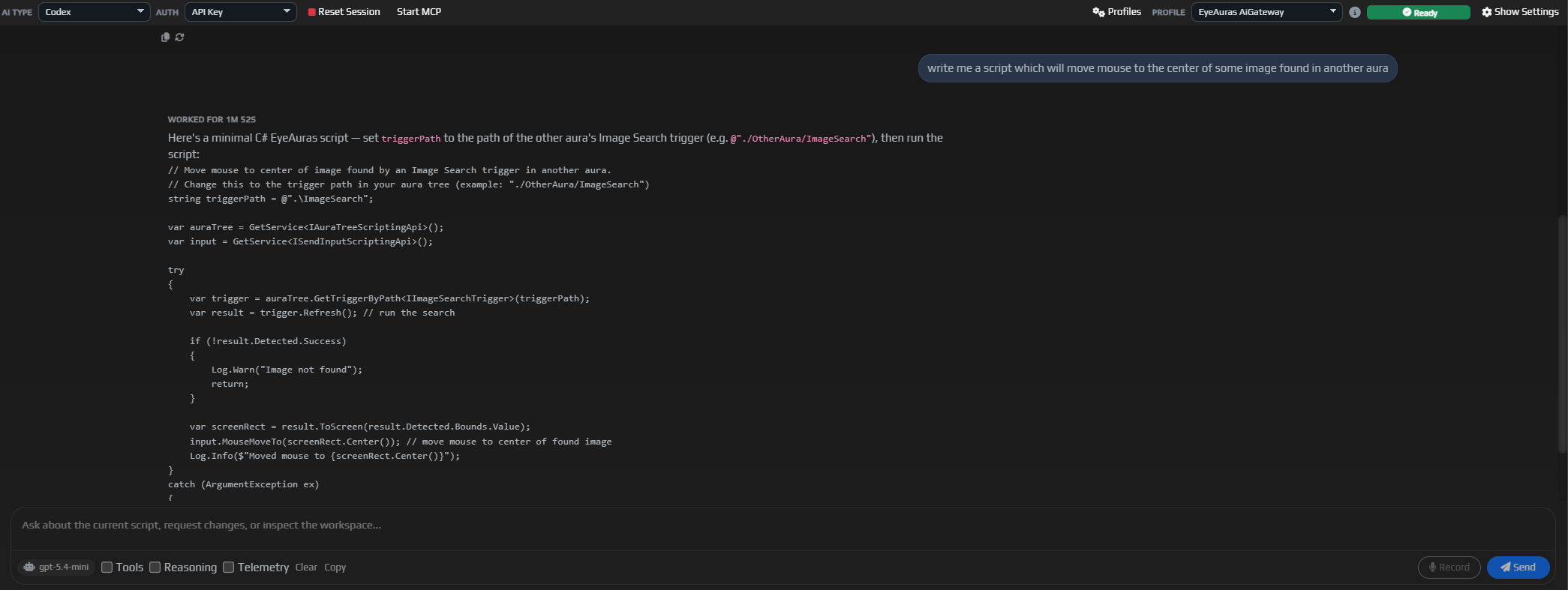
Добавлена поддержка Codex - на мой взгляд, одного из самых сильных AI-ассистентов на сегодняшний день.
По пользовательскому сценарию идея примерно та же, что и с обычным ChatGPT: вы ставите задачу, ассистент пытается ее решить всеми доступными средствами. Ключевое отличие Codex в том, что он заметно глубже закапывается в проблему, чаще перепроверяет свои выводы и поэтому обычно дает более сильный результат именно на сложных технических задачах.
Именно Codex вместе с Claude Code сейчас во многом двигают вперед практическое AI-программирование, и теперь такая интеграция появилась и у нас.
Пока что Codex работает не на полную катушку: не все провода к нему подведены. Например, я умышленно пока не подключал его к системе скриптов, хотя именно это в будущем будет одним из самых актуальных направлений применения и ради них он и добавлялся. Автоматическое построение деревьев поведения, написание скриптов, самодиагностика в стиле "почему не работает" - это как раз те сценарии, где Codex особенно силен. Но сначала недельку посмотрим на качество самой интеграции, пускай поработает как справочник, а дальше мы развяжем ему руки.
Основная область Codex - это сложные задачи: программирование, автоматическая конфигурация аур, деревьев, макросов и похожих систем.
Использовать его просто как справочник - это скорее из пушки по воробьям. Более того, такой сценарий может оказаться просто дороже, потому что Codex имеет привычку перепроверять себя, а это хорошо для качества на сложных задачах, но не очень выгодно на простых.
Вы всегда можете переключаться между Codex и обычным Chat-режимом, но контекст беседы между ними не переносится.
p.s. UI все еще в процессе активно разработки, это далеко не финальная версия
StayOnTop кнопкой в заголовке окнаSubTree в деревьях поведенияThe new interface has been in alpha for several weeks now, and at this point it looks like the most critical issues have either already been fixed or simply haven’t shown up yet.
For all new users, IsBlazorMode = true is now enabled by default. In other words, new installations start with the new UI right away.
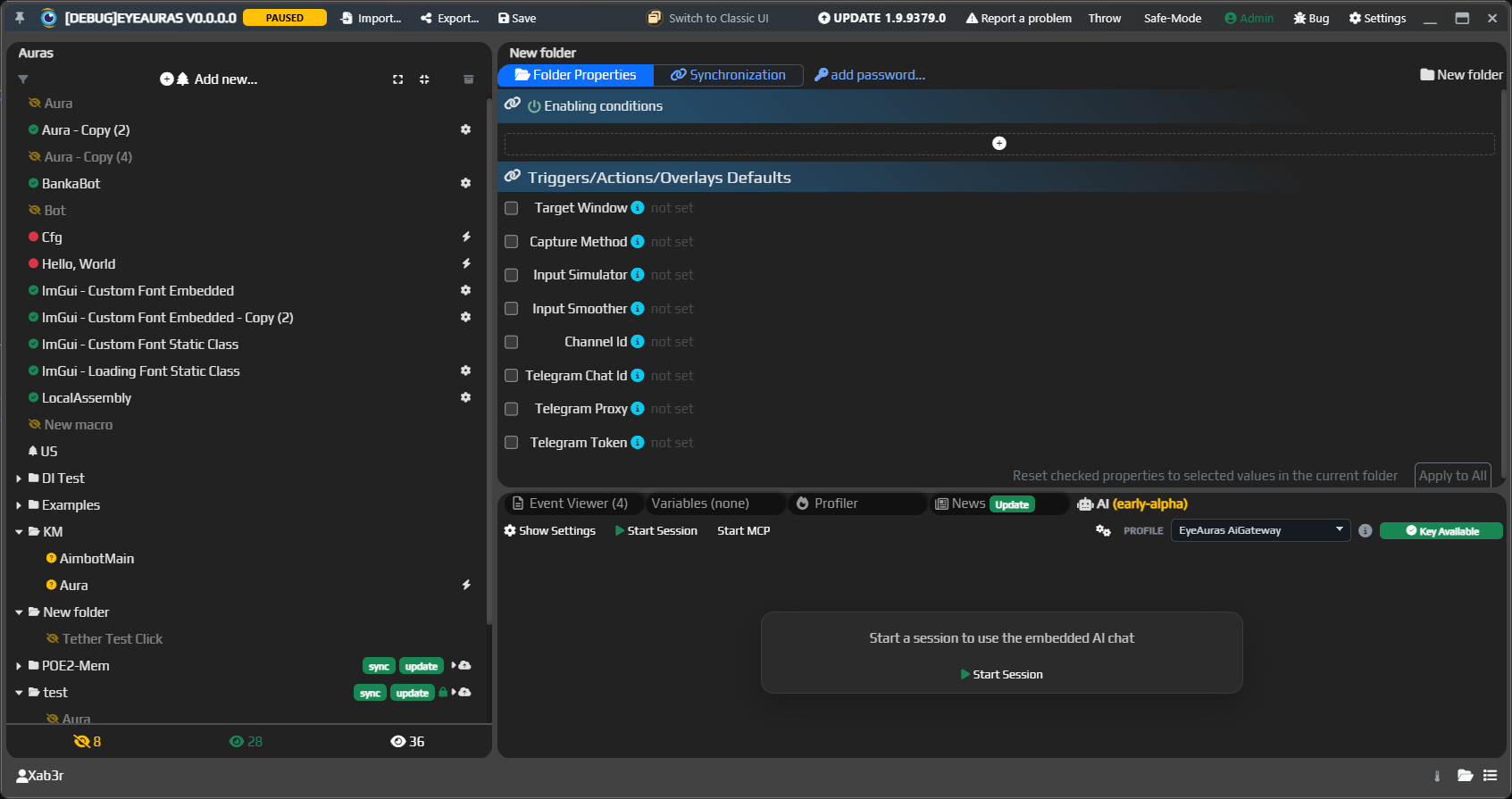
If you are still using the classic shell, I highly recommend at least trying the new interface. It was first introduced here:
We are launching the public alpha of EyeAuras Bot.
This is a bot that lives in Discord, and you can already message it for help with EyeAuras. It knows the documentation and can help with scripts, settings, and common usage scenarios.
The main usage flow is:
@EyeAuras), and the bot will try to join the conversation and answer your question(s). That said, DM is still the better option, and if you do mention it in a channel, it is best to ask the question explicitly — it is simply more reliable that wayThe built-in AI Assistant inside the app should also be getting smarter.
It now understands EyeAuras-specific details better, gives more useful answers about code and scripts, and in general depends much more on the quality of the local wiki. The better and more complete the documentation is, the smarter the built-in AI becomes.
We also added separate documentation for scripting best practices:
EyeAuras Gateway is also evolving. It is essentially a proxy server on top of OpenAI and is meant to solve two simple problems:
At the current stage, it is a convenient way to try AI through EyeAuras infrastructure without registration and SMS (c).
P.S. that is not entirely true — you do still need an EyeAuras account, but you do not need to pay anything.
Anyone can join testing: if you want access to the current alpha, just message Xab3r in Discord DM.
What matters here:
Read more about EyeAuras Gateway
At the same time, the technical documentation for C# scripting is also being expanded.
A separate article has been added for ScriptContainerExtensions. This is the mechanism that lets you register your own services in the script DI container, connect modular libraries, and build larger scripting scenarios, mini-apps, and packs in a cleaner way.
In short, this is an important topic for anyone who has already outgrown a single Script.csx and wants to build a more modular architecture on top of EyeAuras.
The entire wiki is now available in both Russian and English.
The translation is done automatically through AI, so if something looks awkward or the meaning gets distorted in the English version, please let us know:
/limit-usage and /configured-limitsstop button no longer lets any channel participant stop someone else’s request@everyone, role, or user pingsResponses API: added streaming responsesTool Calls, Reasoning, and Telemetry togglesShow Settings windowIsBlazorMode = true)Небольшой follow-up после 9374, все еще вокруг AI.
Теперь в EyeAuras по умолчанию создаются два AI-профиля:
OpenAIEyeAuras GatewayЭто делает старт чуть проще: можно либо сразу использовать свой ключ, либо иметь под рукой уже готовый gateway-профиль, если вам открыт доступ к этой альфе.
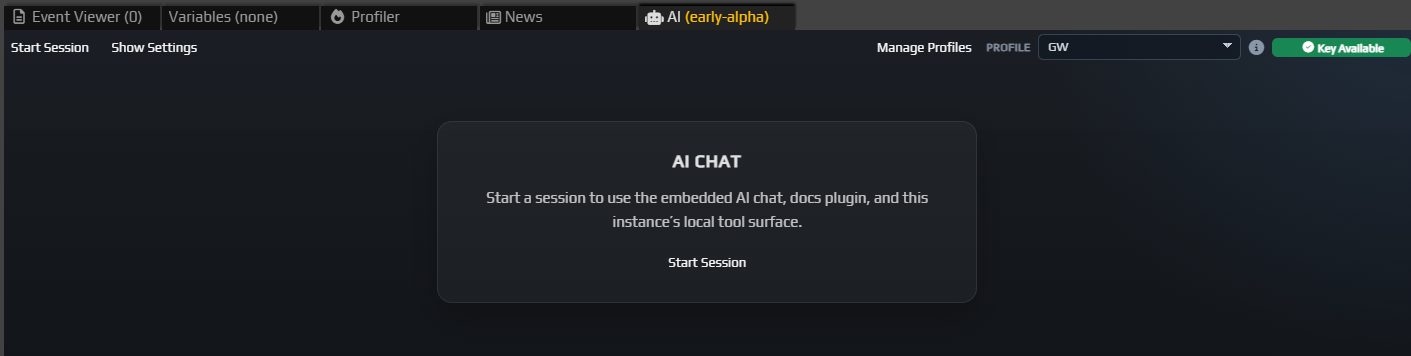
OpenAI и EyeAuras GatewayThe main new feature in this build is the built-in AI Assistant.
EyeAuras now has a dedicated AI tab inside the app where you can:
OllamaEyeAuras AiGateway when neededThis is still an early alpha, but even now it is already useful as an in-app reference and as the first practical layer of deeper AI integration inside EyeAuras.
%EYEAURAS_TOKEN% and EyeAuras Gateway in AI profilesSharePreview crash
Bindings мог не всплыватьSend Sequence мог не раскрываться как ожидается