Stable
1.9.9774
Daily-driver build with the safest release cadence.
- Updated
- 14 weeks ago
- File Size
- 515.39 MB
- Release Notes
- Open notes
Stable is the recommended track for most users. Alpha gets you the newest capabilities first.
Daily-driver build with the safest release cadence.
Fastest release track with the newest features and experiments.
Every release stays linked here so you can inspect what changed before you switch versions.
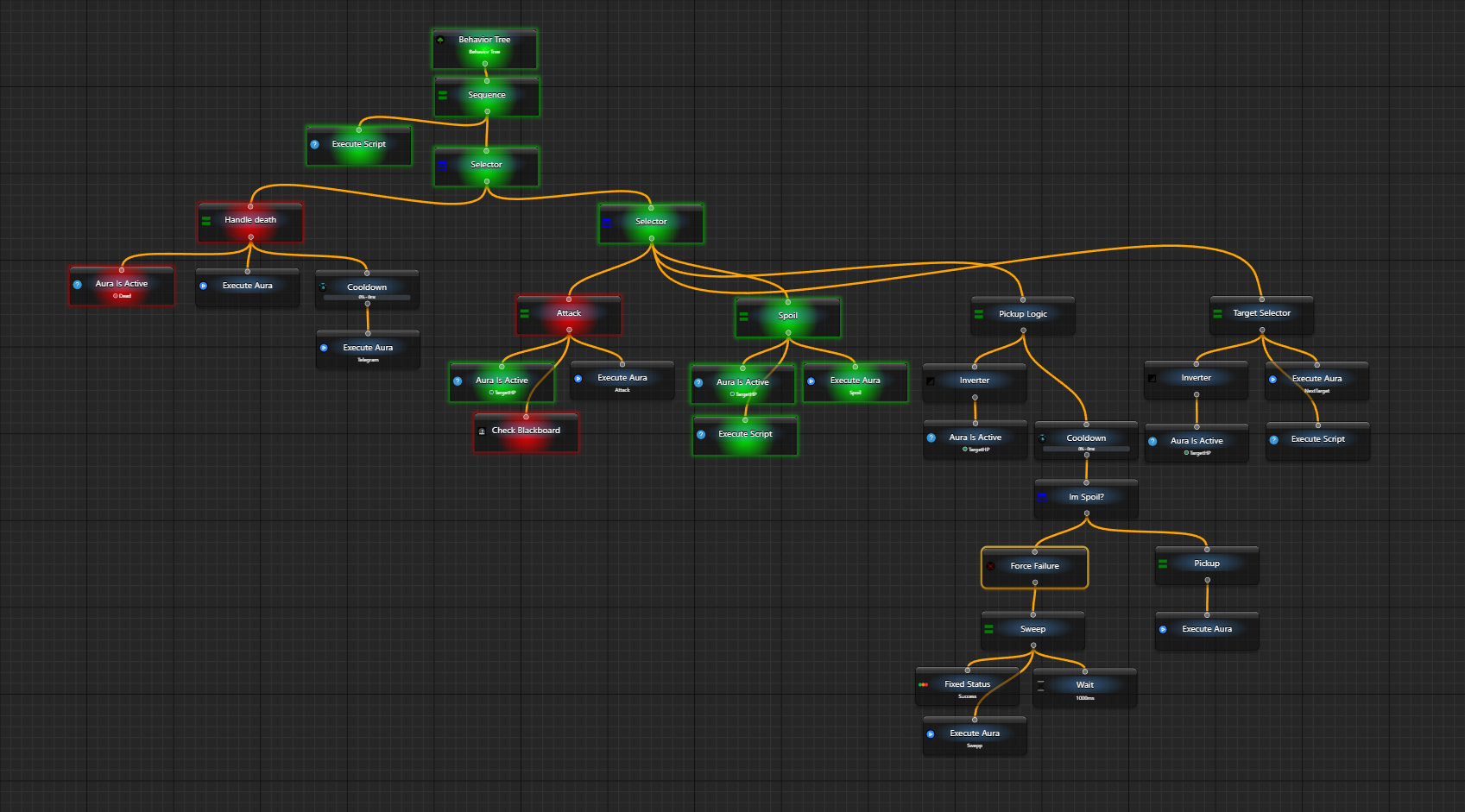
This release contains mostly different improvements and bugfixes from the first week of Behavior Trees being public and people starting doing some scripting in it.
In all triggers of a Search family, new option is added which highlights on the screen the window that is being captured as well as the region inside window (if set) that is processed. This helps during debugging/configuration process a lot. Also ALL OSD checkboxes are bindable so you can very easily throw-in some HotkeyIsActive trigger, bind all checkboxes to its IsActive property and voila - you have toggleable overlay with all bounding boxes/regions/labels right on your screen.

. which will return the aura/folder where the script is running. Refer to this example to get better understanding of what I am talking aboutПосле примерно 6 месяцев работы я очень рад наконец открыть публичное тестирование нового инструмента в EyeAuras — Behavior Trees.
Если коротко, это новый способ собирать логику ваших ботов и скриптов — по сути, основу любой автоматизации. Раньше для этого приходилось использовать Triggers, которые запускали Actions через секции OnEnter, WhileActive и OnExit. В новом подходе у вас будет намного более мощный набор инструментов: cooldowns, conditions, подпрограммы (или поддеревья) и всё это на базе новой подсистемы скриптов.
Это новый meta-подход, и всё, что уже есть в программе, со временем будет адаптировано под использование в деревьях. Я давно считал, что именно этого механизма EyeAuras не хватало: возможности быстро и удобно моделировать что угодно — от простого кликера до сложной боевой ротации. И красота деревьев как раз в том, что они одинаково хорошо подходят и для того, и для другого.
Да, для работы с ними нужно немного разобраться в принципах, как и с прошлой системой. Но когда у вас уже есть десяток разных скиллов, условий и проверок, управлять всем этим становится гораздо проще. Любой, кто пытался собрать в EyeAuras что-то со множеством условий вроде я жив и навык готов, и HP > 40%, и цель выбрана, и ..., скорее всего сразу поймёт, о чём речь.
P.S. Я знаю, что английская версия местами сыровата, но поддерживать документацию сразу на двух языках одновременно довольно тяжело, поэтому тут пришлось немного срезать углы и использовать ChatGPT для автоматизации перевода :D В ближайшие месяцы я это постепенно дополирую.
Пожалуйста, имейте в виду: BT пока использовались максимум парой десятков человек в рамках закрытого тестирования, так что велика вероятность, что где-то что-то не работает, где-то неудобно, а многое ещё изменится в течение следующего квартала. Если у вас есть замечания или репорты — пожалуйста, не стесняйтесь связаться со мной.
Сейчас в BT пока не хватает нескольких очень важных частей:
Прямая интеграция с симуляторами ввода.
Сейчас, если вам нужно двигать мышь или нажимать кнопки, приходится использовать action SendSequence вместе с узлом behavior tree Execute Aura. Это работает, но не слишком удобно. План — продублировать большую часть actions прямо в деревьях, чтобы их было проще использовать и настраивать.
Прямая интеграция с поиском изображений и ML-поиском.
Здесь ситуация похожая: сейчас, например, приходится использовать trigger Image Search вместе с узлом Aura Is Active. Хочется, чтобы всё это можно было редактировать и настраивать прямо в редакторе дерева.
Не хватает некоторых узлов управления потоком.
Например, Switch, IfThenElse и ещё нескольких. Они не обязательны, но очень удобны.
Сам редактор пока тяжеловат.
Хочется сделать его легче, компактнее и менее прожорливым по месту на экране.
Документация.
Я хочу написать МНОГО документации по разным аспектам BT: как они работают, как их можно и стоит использовать, какие у них плюсы и минусы и так далее.
Скриптинг внутри behavior trees.
Переработка scripting system V2 изначально и делалась ради BT — с самого начала я планировал, что продвинутым пользователям точно захочется писать собственные узлы и условия. И именно это должны закрыть Scripts V3.
ПРИМЕЧАНИЕ: выбор через нажатие на кнопку с последующим указанием окна пока не поддерживается — только перетаскивание. Это будет добавлено в одной из следующих версий.


Связка Send Message / Network Message action/trigger — это мощный инструмент, который позволяет собрать собственную управляемую сеть взаимосвязанных EyeAuras. Эта возможность существует уже несколько лет и чаще всего используется для multi-boxing на нескольких ПК.
Главной проблемой всегда была latency — все сообщения проходили через один из серверов EyeAuras, что добавляло задержку. Новый режим broadcasting позволяет обмениваться сообщениями через локальную сеть, что практически убирает эту задержку.
Функция всё ещё находится на очень ранней alpha-стадии и пока довольно сырая в настройке — например, IP нужно указывать вручную. Кроме того, в некоторых конфигурациях она может не работать, если роутер не поддерживает multicast. Также функция пока ещё не протестирована как следует, поэтому используйте её с осторожностью.
Чтобы воспользоваться этой возможностью, укажите ChannelId следующим образом:
p.s. по умолчанию программа использует для связи порт 53082, но при желании можно указать любой другой — сразу после IP в ChannelId (например, broadcast://255.255.255.255:55055/anychannelname)

One of final versions before moving everything to main branch.
Including line number into error messages
Whenever scripting subsystem encounters and error, it will log the exact line of code that led to this and this info will be shown in both application logs(file) and event log.
Writing code without any kind of automatic formatting is a painful process and this feature addresses that. Now you can either press Ctrl+Alt+Enter or use context menu to format the document automatically. It will put in additional line breaks, missing spaces, indentation, etc.
The current version is quite simple, but it is still much better than doing everything manually
Всякий раз, когда подсистема скриптов сталкивается с ошибкой, она записывает точную строку кода, которая привела к этому, и эта информация будет отображаться как в журналах приложения (файл) так и в журнале событий.

Написание кода без какого-либо автоматического форматирования - это тяжелый процесс, и эта функция решает эту проблему. Теперь вы можете либо нажать Ctrl+Alt+Enter, либо использовать контекстное меню, чтобы автоматически отформатировать документ. Он добавит дополнительные переносы строк, пропущенные пробелы, отступы и т.д.
Текущая версия довольно проста, но это все равно гораздо лучше, чем делать все вручную

Много улучшений в том, как выглядит редактор кода и что он может делать.
Теперь, когда в скрипте обнаруживается ошибка, будет специальная разметка, показывающая, что в коде что-то не так, с подробным описанием ошибки. Обратите внимание, что это отражается как на полосе прокрутки, так и на карте кода.
Если есть какой-то известный способ исправить ошибку, например, добавить дополнительный импорт (using …), во всплывающем окне будет показана специальная кнопка под названием "Быстрое исправление...", нажмите на нее, и программа предложит вам одно или несколько потенциальных быстрых исправлений. Названия на данный момент не очень понятны для человека, и я буду работать над этим в одной из будущих версий.
Прототип панели документации, которая будет показывать XML-документы прямо рядом с именем метода/свойства. В настоящее время находится в очень сыром альфа-этапе, без разметки, без подсветки и т.д. В следующие недели будет проверяться, что механизм подготовки этих документов работает.

Добавлена всплывающая подсказка при наведении

Когда вы будете работать с методами, появится специальное всплывающее окно, показывающее текущий параметр, его описание и т.д.

Previously, updates for the program were downloaded from Microsoft Azure cloud, the expectation was that due to vast infrastructure capabilities, download speed will be great in all regions, but… it ended up being worse than from a single server in Saint-Petersburg.
Since this update, the program will download its updates from one of multiple servers located in Frankfurt, Germany, which is a major hub and this should give most users at least “good enough” download speed. We'll see how it goes and maybe I'll scale up that same approach and use multi-regional hosting as well. The current system allows me to fully control from which exact server the download will happen, so there is a wide range of control and possible improvements.
By the way, I'd want to remind about very-very useful option, located in Settings, called Automatically download updates. What it does is, well, it downloads updates… automatically. But does not apply them! Meaning that it won't break anything, the only difference from fully manual update is that you will skip download time.
